
Download AutorunExterminator – autorun.inf, virus protection, pen drive security, USB drive, real-time monitoring, automatic deletion, removable media, malware protection, computer security, digital safety
Overview
AutorunExterminator is a specialized utility designed to combat a persistent threat in digital security: malicious files disguised as autorun.inf entries on removable drives. This application targets one of the most common vectors for virus propagation—USB flash drives, external hard drives, and other portable media. By actively monitoring all logical drives from C: to Z:, it ensures that no unauthorized autorun.inf files remain on connected devices, effectively neutralizing a significant risk before it can compromise a system.
The app is tailored for users who prioritize digital safety and seek a lightweight, no-frills solution to prevent malware infections originating from removable media. Its focus on real-time detection and automatic removal makes it particularly useful in shared computing environments, such as offices, schools, or public computers, where the use of external drives is frequent. While the developer, SoftPas, did not provide additional background on their broader product line, the app’s long-standing presence since 2010 suggests a commitment to reliability and consistent functionality.
Real-world use cases include protecting personal laptops from infections when using public USB ports, securing workstations in IT departments, and ensuring that shared drives remain clean across multiple users. In the broader context of cybersecurity, AutorunExterminator fills a niche by addressing a specific, high-impact vulnerability with minimal overhead. Its simplicity and targeted purpose make it a valuable tool in a layered defense strategy, especially for users who prefer straightforward, effective tools over complex security suites.
Key Features & Functionality
- Real-Time Monitoring: The software continuously scans all logical drives (C: to Z:) for the presence of
autorun.inffiles. This constant surveillance ensures that any suspicious file is detected immediately upon drive connection, preventing automatic execution and potential system compromise. - Automatic Deletion: When an
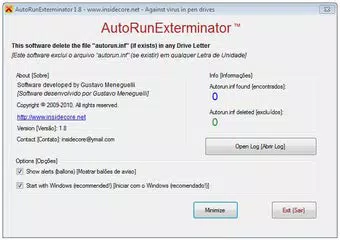
autorun.inffile is identified in the root directory of a drive, AutorunExterminator automatically removes it without requiring user input. This hands-off mechanism ensures that protection remains active even if the user is unaware of the threat. - User-Friendly Interface: The application presents its findings in a clear, minimalistic display. Users can quickly see how many
autorun.inffiles were detected and removed, making it accessible even to those with limited technical knowledge. - Drive-Specific Protection: The tool is designed to protect USB drives and other removable media while intentionally avoiding interference with CDs and DVDs. This prevents disruption of legitimate media functionality while maintaining security on high-risk devices.
- Effortless Security Integration: By focusing exclusively on a single, well-defined threat vector, the app operates quietly in the background. It requires no configuration, does not slow down system performance, and integrates seamlessly into daily computing routines.
For example, a user connecting a borrowed USB drive at a public library would benefit from instant detection and removal of any malicious autorun.inf file, preventing infection without any action required. Similarly, IT administrators can deploy this tool across multiple machines to standardize protection against this specific threat.
Interface, UX & Performance
AutorunExterminator features a minimalistic interface that prioritizes clarity and function over visual flair. The main window displays real-time status updates, including the number of autorun.inf files detected and removed, presented in a straightforward numerical format. Navigation is intuitive, with no complex menus or settings—users simply launch the app and it begins working immediately.
Although the developer did not list formal performance metrics, the application’s small file size of 1.2 MB suggests it consumes minimal system resources. It operates efficiently in the background without noticeable impact on CPU, memory, or disk usage. The software is responsive across a range of Windows devices, from older desktops to modern laptops, indicating broad compatibility within its target ecosystem.
Stability appears to be a core design principle, as the app has remained in active use since its 2010 release. No reports of crashes or conflicts with other software were provided, and its lightweight nature reduces the likelihood of system instability. The lack of frequent updates may reflect its mature, stable codebase rather than a lack of functionality.
Platform Compatibility & Technical Requirements
AutorunExterminator is designed exclusively for the Windows platform. The software is compatible with Windows operating systems, though specific version requirements were not listed by the developer. The application’s file size is 1.2 MB, making it suitable for installation on devices with limited storage space.
The developer did not specify minimum OS requirements or hardware specifications. However, given its low resource footprint and long-standing deployment history, it is likely compatible with a wide range of Windows versions, including Windows 7, 8, 10, and 11. The app does not require administrative privileges to run, which enhances accessibility for users with standard account permissions.
Pros and Cons
Pros
- Lightweight and fast, with minimal impact on system performance.
- Provides real-time protection against a known malware vector.
- Automatic deletion of harmful
autorun.inffiles without user intervention. - Simple, intuitive interface suitable for non-technical users.
- Free to download and use, with no in-app purchases or ads.
Cons
- Specific OS version compatibility was not disclosed.
- Only protects against
autorun.infthreats—does not address broader malware types. - Limited functionality; not suitable for comprehensive security needs.
- No update notifications or changelog available.
- Designed only for Windows, with no support for macOS or Linux.
FAQ
Is AutorunExterminator safe to use?
Yes. The software is designed to detect and remove only autorun.inf files from removable drives. It does not interfere with system files or legitimate media such as CDs and DVDs.
Can I install AutorunExterminator on older versions of Windows?
The developer did not specify minimum OS requirements. However, given its release date in 2010 and small size, it is likely compatible with Windows 7 and later versions.
Does the app require administrator rights?
Based on available information, the app does not require elevated privileges to run, making it accessible to standard user accounts.
Is AutorunExterminator updated regularly?
There is no public information about update frequency. The current version is 1.0.0, and no recent changes have been documented.
Can I use this tool on macOS or Linux?
No. The app is designed exclusively for Windows and is not available on other operating systems.
Final Thoughts
AutorunExterminator stands out as a focused, reliable tool in a crowded security landscape. While it does not offer broad-spectrum protection, it excels in addressing a specific, high-risk vulnerability: the spread of malware via autorun.inf files on removable media. Its simplicity, automatic operation, and minimal resource usage make it an ideal companion for users seeking a no-fuss, effective layer of defense.
It is particularly beneficial for individuals and organizations that frequently use USB drives in shared or public environments. For those who value security without complexity, this tool delivers tangible protection with zero overhead. Though not a replacement for comprehensive antivirus software, it serves as a valuable supplementary measure.
Download AutorunExterminator now


